RBI Office Attendant 2026 Paid Batch – Complete Online Course (10th Pass) Avatar Batch

Description
RBI Office Attendant 2026 Paid Batch – Complete Online Course (10th Pass) Avatar Batch | Complete Batch All Subjects
🚀 Batch Highlights:
- Foundation to advanced syllabus coverage
- Topic-wise practice questions
- Revision sessions & practice drills
- Class Notes + PDFs
- Live + Recorded Classes
- Exam-oriented RBI Office Attendant 2026 preparation
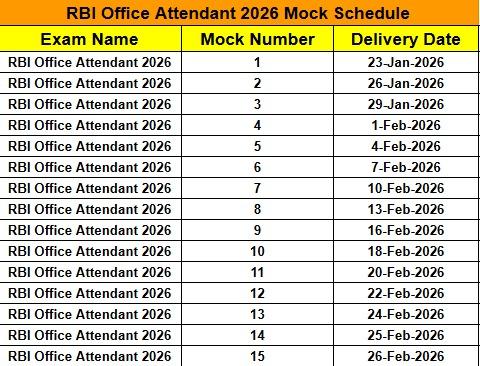
- 15 Mock Tests Free
- Batch Start Date - 19 Jan 2026
Avatar – RBI Office Attendant 2026 Complete Paid Batch is a specially curated course for 10th pass aspirants aiming to crack the RBI Office Attendant exam with strong fundamentals and exam-focused preparation.
This batch covers the syllabus from basic to advanced level, ensuring conceptual clarity, practice depth, and confidence for the actual exam. Classes are conducted by a highly experienced faculty team with years of expertise in banking exam preparation.
⏰ Daily Class Timing (Fixed Schedule)
- Reasoning → 🕒 2:00 PM – 3:00 PM
- English → 🕓 4:00 PM – 5:00 PM
- Maths → 🕔 3:00 PM – 4:00 PM
- GA → 🕕 5:00 PM – 6:00 PM
👨🏫 Expert Educators Panel
- Arun Sir (10+ Years Experience) – Quantitative Aptitude
- Arpit Sir (9+ Years Experience) – Reasoning Ability
- Santosh Sir (12+ Years Experience) – English Language
- Vivek Sir (12+ Years Experience) – General Awareness
Avatar Test Series Schedule
🔹How to Watch Your Courses & Classes
📍On Website (www.examtune.com):
-
Open the ExamTune website and log in with your registered account./ExamTune वेबसाइट खोलें और अपने रजिस्टर्ड अकाउंट से लॉग इन करें।
-
On the top-right corner, you’ll see your profile icon (first letter of your name)./ऊपर दाईं तरफ आपको अपने नाम का पहला अक्षर (Profile Icon) दिखाई देगा।
-
Click on it and select “My Courses” to see all your purchased courses./उस पर क्लिक करें और “My Courses” चुनें — यहाँ आपके सभी खरीदे गए कोर्स दिखेंगे।
-
To watch live & upcoming sessions, go to the “Live Classes” section inside your account./Live और Upcoming classes देखने के लिए अपने अकाउंट में जाकर “Live Classes” सेक्शन खोलें।
- To watch recorded classes, open your course and go to the “Content” tab — you can watch all recorded videos there./Recorded classes देखने के लिए अपना कोर्स ओपन करें और “Content” टैब में जाकर सभी रिकॉर्डेड वीडियो देखें।
📱 On ExamTune App:
-
Open the ExamTune App and log in with your registered mobile number./ExamTune App खोलें और अपने रजिस्टर्ड मोबाइल नंबर से लॉग-इन करें।
-
At the bottom (footer) of the app, tap on “My Courses.”/ऐप के नीचे (footer) में “My Courses” पर टैप करें।
-
You’ll find all your purchased batches listed there./यहाँ आपको आपके सभी खरीदे गए बैच दिखाई देंगे।
-
To watch live & upcoming classes, tap on the “Live Classes” option inside the batch./Live और Upcoming classes देखने के लिए बैच के अंदर जाकर “Live Classes” विकल्प पर टैप करें।
- To watch recorded classes, open your course and go to the “Content” tab — all recorded lectures will be available there./Recorded classes देखने के लिए अपना कोर्स ओपन करें और “Content” टैब में जाएँ — वहाँ सभी रिकॉर्डेड लेक्चर उपलब्ध होंगे।
This batch is ideal for beginners and serious aspirants who want a structured, guided, and result-oriented preparation under expert mentorship.
Note - You will get Tejas Batch in free of cost, check in my courses section and then in vod section, you will get it there.
Loading...